Pixie: The Futuristic Display Font for Modern Craft Brands
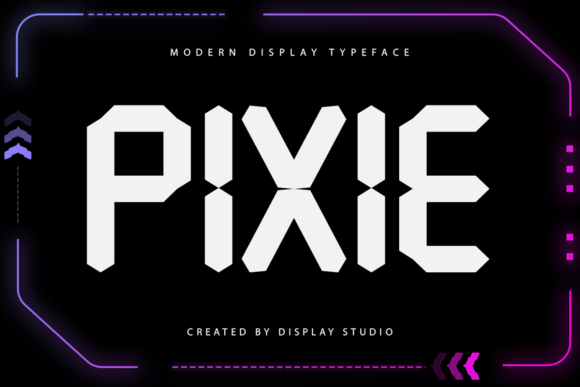
When I first started selling my handmade goods online, I realized that the font on my product labels made or broke the sale. Customers might love the quality of a candle or a sticker, but if the typography looks dated or generic, they assume the whole brand is mass-produced. That is exactly why Pixie has become a staple in my design toolkit. This modern and cool display font brings a futuristic touch to any project without feeling cold or unapproachable. It is perfect for brand logos, website headers, labels, or pretty much any design that requires a unique visual identity.
As a creator who spends hours cutting vinyl with a Cricut or designing printable planners for Etsy, finding a typeface that balances style with practicality is crucial. Pixie fits that bill perfectly. Its sleek lines and contemporary curves give your physical products an instant upgrade. Whether you are creating boutique tags for a clothing line or designing seasonal packaging for holiday gifts, this font helps elevate the perceived value of your work. It transforms simple items into premium experiences.
Why Pixie Stands Out for Handmade Products
The visual personality of Pixie is distinctively forward-thinking. Unlike traditional serif fonts that feel nostalgic or standard sans serifs that can look too corporate, Pixie sits right in the sweet spot of modern creativity. It captures the imagination while remaining highly readable. When you use this display font on a small sticker or a product label, it draws the eye immediately. The sharp angles and smooth transitions create a sense of movement and energy that static fonts often lack.
I have found that using Pixie for short phrases, names, and titles works exceptionally well. Because it is a display typeface, it is designed to be seen from a distance or up close as a focal point. Trying to set long paragraphs of body text in Pixie would likely result in readability issues, which is why I stick to using it for headlines, main branding elements, and decorative wording. For example, when I design wedding welcome boards, the bold presence of Pixie makes the couple's names pop against the background, setting a sophisticated tone for the event before guests even walk through the door.
Real-World Applications for Makers
The versatility of this creative font allows it to adapt to a wide range of craft projects. Here are some specific ways I incorporate Pixie into my business:
- Candle and Soap Labels: The futuristic aesthetic pairs beautifully with minimalist packaging. I use Pixie for the brand name on soy wax candles, giving them a high-end, artisanal look that stands out on a shelf.
- Birthday and Event Invitations: For milestone birthdays or modern-themed parties, Pixie adds a trendy flair. It works wonderfully for digital invitations sent via email or printed cards included in party favor bags.
- Farmhouse and Wall Art: While "farmhouse" often implies rustic scripts, mixing in a modern display font like Pixie creates an eclectic, updated look. I use it for motivational quotes on canvas prints where the message needs to feel current and crisp.
- Merchandise and Apparel: When printing designs on t-shirts, tote bags, or mugs, the clean lines of Pixie ensure that the text remains legible even after washing or wear. It holds its shape well on curved surfaces.
- Holiday Packaging: During busy seasons like Christmas or Halloween, speed and impact are key. Pixie allows me to quickly design festive tags and wrapping paper accents that still maintain a professional brand identity.
Readability and Technical Considerations
One of the most important factors for any commercial font is how it performs in production. When I cut designs for stickers or prepare files for print-on-demand services, clarity is non-negotiable. Pixie excels here because its letterforms are open and distinct. Even when scaled down for small product tags or tiny decals, the characters do not merge together, ensuring that customers can read the information clearly.
For those using cutting machines like Silhouette Studio or Cricut Design Space, Pixie is a joy to work with. The vector paths are usually clean, which reduces the risk of tearing during weeding. However, I always recommend testing a small sample on scrap material first. If you are creating intricate SVG-style designs, check the included styles, alternates, and ligatures to see if they enhance your specific layout. Some display fonts offer swashes or special characters that can add extra flair to a logo, making it feel more custom-made.
If you are planning to sell digital downloads, such as templates or printable wall art, the file format matters. Ensure you have access to the full suite of formats (like OTF or TTF) so that clients can easily install the font on their devices. Additionally, checking for multilingual support is a smart move if you plan to reach a global audience. A robust character set means you won't be stuck trying to find a workaround for accented letters in international markets.
Mastering Font Pairing for Brand Consistency
No single font can do everything. To create a cohesive brand identity, pairing Pixie with complementary typefaces is essential. Since Pixie is a strong display font, it pairs best with simpler, understated fonts for secondary text. I often pair it with a clean sans serif font for descriptions, ingredients lists, or social media captions. The contrast between the futuristic display of Pixie and the neutral simplicity of a sans serif creates a balanced hierarchy that guides the viewer's eye.
For a softer approach, especially in stationery or invitation design, you might try pairing Pixie with a handwritten font. The organic flow of a script font can soften the sharp edges of Pixie, creating a dynamic mix of modern and personal. Just remember to keep the weights consistent; don't let a heavy Pixie headline clash with a delicate script unless that is the specific effect you are aiming for. Good font pairing elevates your design assets from "good" to "professional."
Licensing and Commercial Use
Before you start using Pixie on your next batch of products, it is vital to understand the licensing terms. As a seller, you need a commercial font license that covers physical products, templates, printables, digital downloads, SVG designs, merchandise, and client work. Many free fonts restrict usage to personal projects only, which can lead to legal trouble if you sell items featuring them. Pixie is designed to be a commercial font, but always verify the specific license agreement provided by the foundry.
A proper license gives you peace of mind. It ensures that you can confidently put your Pixie-designed logo on a storefront sign, include it in a bundle of digital resources, or print it on thousands of shirts without worrying about infringement. This protection allows you to focus on what you do best: creating beautiful, functional products that your customers will love.
In the world of handmade goods, details matter. Pixie offers a modern and cool display solution that helps your brand stand out in a crowded marketplace. By choosing a typeface that reflects quality and innovation, you signal to your customers that you care about every aspect of your product, from the material inside to the words on the outside. Whether you are updating your website, rebranding your labels, or launching a new line of digital printables, integrating Pixie into your workflow is a strategic step toward building a recognizable and successful craft business.